TL;DR: A website chat that sells does five things in one conversation — it answers, qualifies, recommends, handles the objection, and collects the payment — instead of logging a ticket and handing the buyer to a human, a Shopify checkout, or a CRM. Today most "payment in a chat" is operator-issued, a hosted link, or a redirect to a store. The sharper wedge is an autonomous selling AI that completes the payment in the conversation and speaks in one brand voice across your site and messengers. This guide maps the whole loop, maps how each tool actually collects money, and gives you a scorecard to grade your own chat.
For: ecommerce, SaaS, and service owners with real web traffic. What you'll get: the full sell-and-pay loop, a comparison that can lose a row, transparent cost math, and a self-diagnosis. Last updated: 2026-07-05.
The 60-second version
- A support chat answers questions well and still loses the buyer, because "resolved" and "sold" are different outcomes.
- The full loop has five steps: converse → qualify → recommend → close → take payment — most tools stop at step three.
- "Payment in a chat" already exists, but in four different shapes: operator-issued, hosted-link, Shopify-redirect, and agentic-commerce — and each collects money differently (table below).
- The pricing question that matters is not "cost per resolution" but "what you pay when nothing sold."
- Grade your own chat with the Sell-or-Deflect Scorecard at the bottom before you change anything.
Why your website chat loses the buyer
Your website is your highest-intent traffic. Someone typing "do you deliver by tomorrow morning?" is closer to buying than any cold list you could message. Yet the default job of a website chat is deflection: answer the question, close the ticket, keep the human's queue short. That is a support metric. It is not a revenue metric, and the gap between them is where the sale leaks out.
It is 23:40. A visitor arrives from an ad you paid for and asks about a same-day option. Your operator is offline. A support-first widget does exactly what it was built to do: it captures the email, files a ticket, and promises someone will reply. By 9am the buyer has already bought elsewhere. Nothing broke. The chat "worked". You just paid for the click, answered the question, and still lost the order.
The leak is not slow support. It is that the tool was never asked to close. Once you frame the job as revenue, three questions appear that a deflector cannot answer: who recommends the right thing, who handles the objection at the moment of hesitation, and who collects the money before the intent cools.
The full loop: from "hello" to paid
A chat that sells runs one continuous conversation through five steps. The first three are common. The last two are where almost every tool hands off.
- Converse — the agent answers from your knowledge base and speaks in your voice, not a generic script.
- Qualify — it works out what the visitor actually needs (size, budget, timing, use case).
- Recommend — it proposes the specific product, plan, or service that fits.
- Close — it handles the price or trust objection right there, instead of booking a callback.
- Take payment — it issues the invoice or checkout inside the thread, confirms it cleared, and the lead lands in your flow.
Steps 4 and 5 are the whole game. A tool that qualifies beautifully and then drops a "our team will contact you" has handed the sale to a slower, more expensive human at the exact second the buyer was ready.
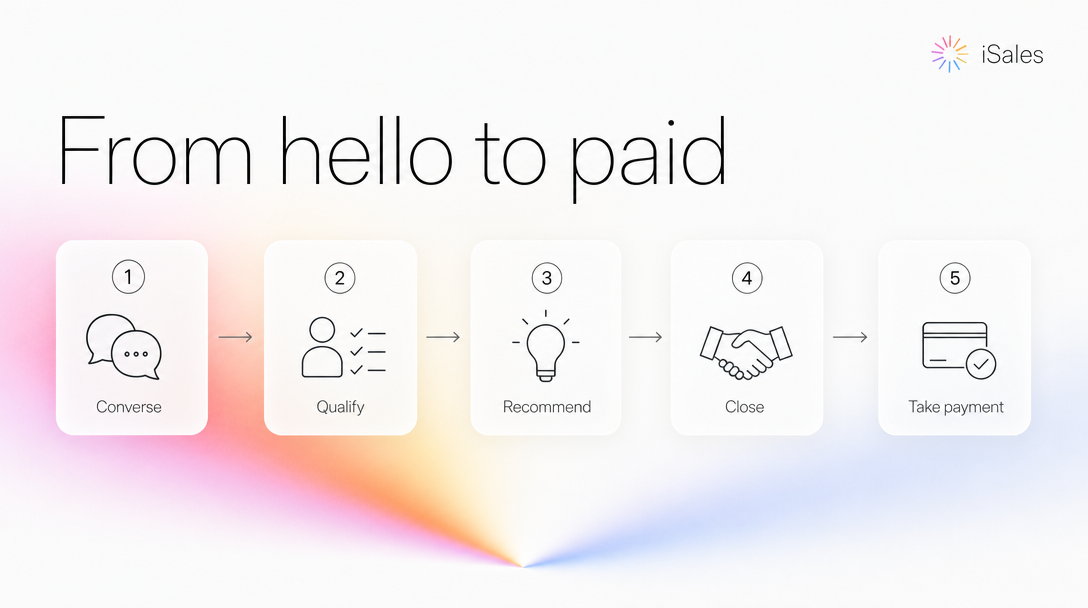 One continuous conversation, from "hello" to paid — most tools stop at step three.
How "payment in a chat" actually works today
Taking money inside a chat is not new or rare. It already ships in four distinct shapes, and only one is an AI closing the sale on its own. Knowing which is which is how you avoid buying a demo that means something different than you think.
| How "payment in chat" actually works | Who does it | Who triggers the payment | The catch |
|---|---|---|---|
| Operator-issued invoice | Jivo, Bitrix24 Sales Center, Envybox (RU); LiveChat + Stripe app | A human clicks "issue invoice" | The AI qualifies; a person still has to be online to charge |
| Hosted payment link | HubSpot Breeze (beta), payment-link chatbots (FlowXO, Boei → Stripe/PayPal) | AI drops a link; buyer leaves to a hosted page | Not completed in the conversation; often CRM-bound or DIY glue |
| Shopify / store redirect | Zipchat, Gorgias | AI nudges toward the store checkout | The payment leaves the chat; edits existing orders at best |
| Agentic commerce | ChatGPT Instant Checkout + Stripe (since Sep 2025) | The buyer pays inside ChatGPT, not your site | Proves shoppers will pay in a conversation — but on OpenAI's surface, for catalog merchants, not your branded chat |
(Competitor mechanics research-dated July 2026; verify current behavior before you rely on it.)
Two takeaways from this table. First, "we take payment in chat" is true for a lot of tools and still tells you almost nothing until you ask who pulls the trigger. Second, agentic checkout is the loudest signal of the year that buyers are comfortable paying mid-conversation — which is why an autonomous seller on your own site, in your own voice is the option to weigh if checkout on your own traffic matters. The distinction that matters is narrow and specific: an AI that completes the payment in-conversation itself, not an operator, not a link, not a redirect.
Deflect vs sell: the comparison
Set the neighbours side by side on the jobs that decide revenue, including the ones a selling widget loses.
| Support deflector (Intercom Fin, Tidio Lyro, Gorgias) | Operator-driven chat (Jivo, Bitrix24) | Autonomous selling AI | |
|---|---|---|---|
| Answers + qualifies 24/7 | ✅ | ⚠️ needs an operator online | ✅ |
| Closes and takes payment itself | ❌ hands to human/CRM | ⚠️ human issues the invoice | ✅ completes it in-thread |
| Same brain on site and Telegram/WhatsApp/IG | ❌ often no Telegram at all | ⚠️ per-channel setup | ✅ one KB, one voice |
| Deep multi-agent helpdesk, SLA routing, ticketing | ✅ mature and deep | ⚠️ | ❌ not the tool for this |
| Priced on | per resolution / per seat | per seat / per dialog | usage / per action |
If your real need is a full support desk with escalation tiers and SLA reporting, a deflector like Intercom or Zendesk is better than a selling widget, and you should keep it. A selling AI is a closer on hot traffic, not a ticketing system. The two can coexist: support deflects the routine, the seller works the buyers.
What it actually costs: per-resolution vs usage
The cost debate is usually framed as "how cheap is a resolution". That is the wrong denominator. You do not want cheap resolutions; you want the money left after them.
Take a real, published number. Intercom's Fin bills $0.99 per outcome (a resolution, a handoff, or a disqualification), with a 50-outcome monthly minimum (fin.ai, July 2026). A store that resolves ~1,000 conversations a month pays roughly $990/month on that meter — whether or not a single one of those conversations became a sale. The meter runs on tickets, not revenue. Tidio's Lyro shows the same shape from the other side: an add-on from ~$39/month for 50 AI conversations that steps up to a $749/month tier with little in between (tidio.com, July 2026).
A usage model inverts the denominator. You're billed for each action the agent takes (a reply costs a fraction of a cent in model tokens), on a prepaid balance, and the cost tracks activity rather than headcount or ticket volume. It is not a magic "pay only when you sell" promise — you still pay for the work the agent does. The difference is that no per-resolution fee is added just because a conversation was resolved. (Plug your own conversation volume into both models before deciding; your numbers, not ours.)
One selling brain, not four bots
A unified inbox that pipes WhatsApp, Telegram, your site into one window is table-stakes now; nearly everyone has it. The thing that is still rare is one selling brain behind all of them: the same knowledge base, the same brand voice, the same behaviour, whether the buyer starts on your landing page or continues in a messenger.
That continuity is the payoff of the after-hours scenario. The visitor who asked about same-day delivery at 23:40 gets answered and charged on the site — and when they follow up next week in Telegram, it is the same assistant with the same context, not a fresh bot that has never met them. With iSales that assistant is one you configure once and place on the site, in Telegram, WhatsApp, Instagram, Facebook, managed from Telegram. Hard or risky cases escalate to you; the routine ones it handles alone.
The Sell-or-Deflect Scorecard
Before you switch anything, grade the chat you already run against these seven rows.
| # | Does your website chat… | Yes / No |
|---|---|---|
| 1 | Reply within seconds, after hours, without a human online? | |
| 2 | Qualify the visitor (need, budget, timing) rather than just answer FAQs? | |
| 3 | Recommend a specific product/plan, not a catalogue link? | |
| 4 | Handle a price or trust objection in the moment? | |
| 5 | Close and take the payment inside the conversation (no human, no redirect)? | |
| 6 | Run the same brain and voice on your messengers, not a separate bot? | |
| 7 | Bill you on usage/outcome, not per seat or per resolved ticket? |
Scoring: mostly rows 1–2 → you have a support chat. Rows 1–4 → a good lead-capture chat that still hands off the close. All seven, especially rows 5–6 → you have an autonomous seller. Row 5 is the one almost no tool can tick.
When a selling widget is the wrong call
Some readers should not buy this yet.
- Under ~5–10 inbound sales conversations a day, and you're usually at your phone. Answering yourself and sending a manual invoice is fine. The autonomous seller earns its place when hot traffic arrives faster than you can reply, especially outside working hours.
- You mainly need a support desk. If ticketing and multi-agent routing are the job, keep Intercom or Zendesk. A seller is not a help desk.
- You want zero oversight. An autonomous agent will confidently get an edge case wrong. Plan to skim its first day or two and correct the knowledge base. It gets better; it is not "set and forget" on day one.
- Local tax rules still apply. Taking payment in a chat does not exempt you from your country's fiscal-receipt or invoicing obligations. The rails handle the charge; the compliance stays yours.
Explore the cluster
This is the hub. Go deeper on the piece you need: a chat that sells rather than deflects, how to take payment in the chat, why payment is usually operator-issued and how to make it autonomous, an Intercom/Jivo alternative that takes payment, what a widget really costs, one AI across site and messengers, recovering hot ad traffic, and selling content or consults from your site. Related brains: the same assistant across Telegram and messengers, the sell-and-pay monetization engine, and WhatsApp automation it continues into.
FAQ
Live chat or chatbot — which converts better? Neither label matters; the behaviour does. A human live chat closes well but not at 2am; a scripted bot is always on but rarely closes. What converts hot traffic is an agent that is both always-on and able to recommend, object-handle and charge. Grade yours on the scorecard, not the category name.
How do I take a payment inside my website chat? Four ways today (see the table): an operator issues an invoice, the bot drops a hosted link, it redirects to a store checkout, or an autonomous agent completes it in-thread on your own payment rails. Decide which you actually need before buying, because vendors call all four "payment in chat".
Is in-chat payment PCI-compliant? The card data should never touch the chat. Reputable flows hand the actual charge to a PCI-compliant processor (Stripe or YooKassa), so the conversation shows the invoice and confirmation while the sensitive step happens on the processor's hosted page.
Can ChatGPT already take the payment — do I still need a widget? ChatGPT's Instant Checkout (with Stripe, since Sep 2025) lets shoppers buy inside ChatGPT, which proves the behaviour works. But it runs on OpenAI's surface for catalogue merchants, not on your branded site in your voice, and it does not continue the relationship into your Telegram or WhatsApp. A widget puts the seller where your paid traffic already lands.
How is this priced versus Intercom or Tidio? Those bill per resolution or per seat (Fin ~$0.99/outcome; Lyro from ~$39/mo, stepping to $749; July 2026). A usage model bills for the work the agent does on a prepaid balance, so a resolved-but-unsold conversation costs you nothing extra. Run your own volume through both.
Will an AI on my site sound like a dumb bot? It is only as good as what it is grounded in. Point it at your real knowledge base and brand voice, keep human-on-exception escalation for hard cases, and skim its early conversations. A seller grounded in your docs reads very differently from a generic FAQ bot.
Next step
Grade your chat on the scorecard above. If row 5 is a "no" and you have the traffic to justify it, put an AI salesperson on your site and let it run the whole loop — the first 30 messages are free to try. Start in Telegram: Put an AI salesperson on your site →
Sources & last updated
- Intercom Fin pricing — fin.ai/pricing
- Tidio / Lyro pricing — tidio.com/pricing
- Operator-issued payment in chat — jivosite.ru payment announcement
- Agentic checkout — OpenAI Instant Checkout + Stripe newsroom
- iSales pricing and free tier (usage model, first 30 messages free) — /en/pricing
Competitor prices checked July 2026 — list prices, subject to change.