TL;DR: A brand-new WhatsApp number that starts sending to a list on day one reads as a spam bot and gets flagged fast. The fix is a gradual behavioral ramp over about two to three weeks — a couple of days of quiet presence, then replies only, then slow proactive sending inside a strict hourly cap. Below is a paste-able 21-day table you can run by hand for free. Warmup lowers your ban risk; it does not buy immunity, and it changes how your number behaves, not the protocol it connects with.
If you run WhatsApp broadcasts to your own list on a regular number (not the official Business API), the single most common way to lose that number is impatience in the first two weeks. This guide gives you the calendar to avoid that, the pacing rules that keep it alive after warmup, and a clear-eyed read on when the whole exercise is unnecessary.
This is the granular-schedule spoke of our complete guide to WhatsApp automation on your own number. If you're here because a vendor promised "no bans," read the why "no bans" is a myth piece first — this one assumes you've accepted that bans are a risk you manage, not one you eliminate.
Two different things are called "warmup" — you want the behavioral one
Before the schedule, clear up a naming collision that wastes people's first week.
The official WhatsApp Business API has a built-in messaging-tier ladder. An unverified sender starts at 250 unique recipients per 24 hours; after business verification you land at 1,000/day, and through 2026 Meta is collapsing the intermediate tiers so a verified business jumps straight to 100,000/day (rollout began with select partners in Q1 2026). Since October 2025 those limits are shared across every number in one Business Portfolio, and Meta re-evaluates your tier every six hours based on volume and quality. That ladder is automatic. You don't "warm up" for it by hand; you earn it by sending clean traffic at good quality ratings.
This article is about the other warmup: a new number on your own regular line, connected through an unofficial tool, sending to your own contacts. There's no tier ladder here and no published threshold — WhatsApp does not tell you "you're banned at N messages." What you have instead is a behavioral profile the anti-spam system reads, and a set of practices that integrators have converged on to keep that profile looking human. Everything below is that convergence, dated and sourced, not a rule Meta published.
The 3-gate warmup: age, then reciprocity, then pace
The scattered advice across warmup vendors reduces to three gates a number passes in order. A number only graduates a gate when the previous one is clean.
- Gate 1 — Age (the days 1–2 rows below). The number just exists: a real profile photo, a name, a short bio, and a few minutes online. No sending. A number that posts a photo and immediately messages 200 people is the clearest bot signal there is.
- Gate 2 — Reciprocity (the replies-only rows, days 3–7). The number only replies, to people who message it first. This earns inbound signal, which is the strongest trust marker you can build early. You're not broadcasting yet; you're having conversations.
- Gate 3 — Pace (days 8 onward). Only now do you send proactively, and only to contacts who opted in, ramping the daily count slowly while holding a hard hourly cap. This is where most numbers die: people reach Gate 3 and treat it as "warmup's over, send everything." It isn't. Gate 3 is a speed limit you keep forever.
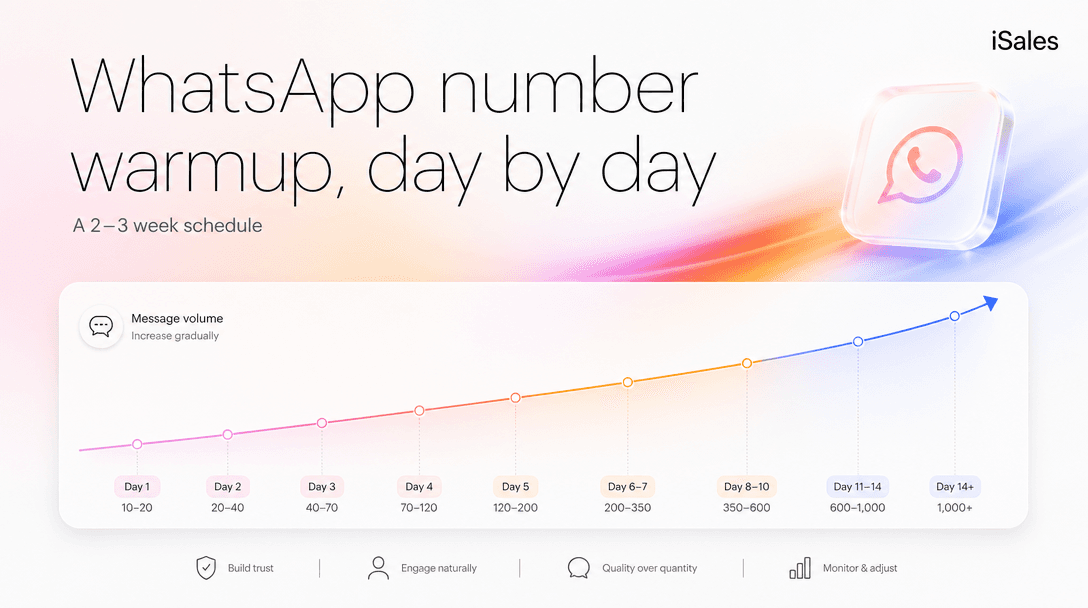
The 21-day schedule (copy this table)
Numbers below are the range integrators like GREEN-API, wadesk and sheetwa converge on for an own-number ramp, accessed 2026-07-05. Treat them as a conservative shape, not a guarantee — vary the exact counts so no two days look identical.
| Days | Gate | Daily outbound | What to do |
|---|---|---|---|
| 1–2 | ① Age | 0 | Fill the profile (photo, name, bio). Appear online 1–3 min. Send nothing. |
| 3–5 | ② Reciprocity | 5–10 (replies only) | Answer people who message you first. Vary the wording. Leave minutes between replies. |
| 6–7 | ② Reciprocity | 10–20 (replies only) | Still reactive. Join 1–2 small groups; take a short call or two. Open unread chats. |
| 8–10 | ③ Pace | 20–30 | Begin proactive messages to opted-in contacts. Hold ≤15/hr, ≤2/min, random 30–90s gaps. |
| 11–14 | ③ Pace | 30–40 | Keep quality up — aim for replies, not just sends. Stop after ~6 hours of activity in a day. |
| 15–21 | ③ Pace (steady) | 40–50, then hold | This is steady state for a broadcast number. Don't chase higher just because today went fine. |
A few numbers matter here. A fresh account that sends 5–10 a day sits in a conservative, lower-risk range (no send count is "safe" on its own); integrators warn that a warmed number can push toward 100/day for genuine two-way conversation, and most advise staying under ~200/day even on an aged number. For a number whose job is outbound broadcast to a coolish list, the conservative ceiling is far lower than the maximum. Sitting around 50/day at no more than 15/hr keeps the number bursting-free, which is the behavior detection is tuned to catch. A tool built for own-number broadcasting enforces that cap for you (typically a 7-day warmup floor before any broadcast can start, then a hold at roughly 50/day and 15/hr), and it's the same number you'd pick by hand if you were being careful.
A few things the schedule table can't show on its own: keep at least half your messages getting replies (a number nobody answers looks like a broadcaster), and never send for more than about six hours a day or three days straight without a gap. And do the arithmetic before you start: at a 50/day ceiling, a 600-contact opted-in list takes about twelve sending days to clear after the two-to-three-week warmup — roughly a month end to end, not an afternoon (your list, your pace).
Warmup is more than sending — it's activity
A number that only sends, even slowly, still looks one-dimensional. The activity that reads as "a person owns this phone" is broader:
- appear online for a minute or two at natural times, not as a 24/7 beacon;
- open and read the chats you receive instead of leaving them all unread;
- be in a small number of groups (join 1–3 over the first week, not twenty at once);
- take or make the occasional short voice call;
- react, send the odd voice note, behave like the account belongs to a human with a life.
None of this is exotic. It's what separates a number a person clearly uses from one that only pushes messages out, which is exactly the split the anti-spam system is built to catch.
When to run this by hand — and when not to
The vendor how-tos skip past one thing: for a single number you'll actually babysit, you don't need a tool for any of this. The table above is the whole method. Copy it, set phone reminders, and warm the number yourself for free. If that's your situation, close this tab and go do it.
A tool earns its place in two specific cases, and it's worth naming who should not buy one:
- You're warming more than one number, or you know you won't hold the pace by hand past day three. Enforcing "≤15/hr, stop after six hours, hold at 50/day" on yourself across several numbers is the actual work, and it's the part software does without getting bored or optimistic. This is the job iSales does — it holds the number to the warmup floor and the caps so an eager Tuesday afternoon can't undo two weeks.
- Skip the own-number path entirely if you need to reach cold, non-opted-in contacts at hundreds a day. No warmup schedule saves that number; the volume plus the spam reports will end it regardless of how patient you were. That's the official API's job (the 250→1,000→100,000 ladder above), or it's a campaign you shouldn't run.
And the ceiling, covered in depth under the protocol-fingerprint problem: warmup changes your behavior signal, not the protocol fingerprint any unofficial tool connects with. Discipline moves your odds a lot — integrators broadly agree a respond-only number is far more durable than one running aggressive cold outreach — but it never reaches zero. A schedule that lowers the risk earns its place; no tool can sell you the version that removes it.
FAQ
How long does WhatsApp warmup take? Plan for two to three weeks before a number is doing real proactive volume, with the first 7–10 days being the fragile part. Integrators note a number is meaningfully more resilient after ~10 days and "settled" around 25–30 days of clean activity.
Can I speed it up with a burner number? No. Burners have no history and no trust, so they get flagged fastest. A real number you warm and pace outlives a stack of cheap ones.
How many messages a day is safe after warmup? There's no published number. For an outbound broadcast number, a conservative steady state is roughly 50/day at no more than 15/hour; integrators say aged conversational numbers can go higher, but "can" and "safe for cold-ish sends" are different questions.
Does warmup stop me from ever getting banned? No, and anyone who says otherwise is selling something. Warmup lowers the odds by making your number behave like a person. Protocol-level detection is outside your control, so treat any single number as replaceable.
Do incoming replies count against my limit? On the official API, service replies inside the 24-hour window don't count toward the messaging-limit tier. On an own-number setup there's no formal counter at all — but replies are exactly the signal you want, so more of them is good either way.
If your job is warming and pacing several numbers on your own list, the AI Growth Starter walks you through connecting a number and turning on a guided warmup that enforces the schedule above. Connect your WhatsApp agent and start warmup.
Sources (accessed 2026-07-05): GREEN-API warmup guide (day-by-day ramp, activity practices); wadesk / sheetwa warmup schedules (week 1–3 ranges); Meta for Developers — WhatsApp Messaging Limits (official tier ladder, portfolio limits since Oct 2025, 2026 tier changes). Integrator figures are best-practice convergence, not WhatsApp-published thresholds.