Meta: WA, IG, FB
अपनी reach बढ़ाना: अपने AI Chatbot को Meta Messengers (WhatsApp, Instagram, Facebook) से जोड़ना
अपने iSales AI Chatbot को सबसे popular messaging platforms: WhatsApp Business, Instagram Business और Facebook Business से connect करके customer communication को supercharge करें। यह integration आपके AI assistant को multiple channels पर conversations manage करने, support देने और customers से seamlessly engage करने देता है।
Centralized management, broader impact
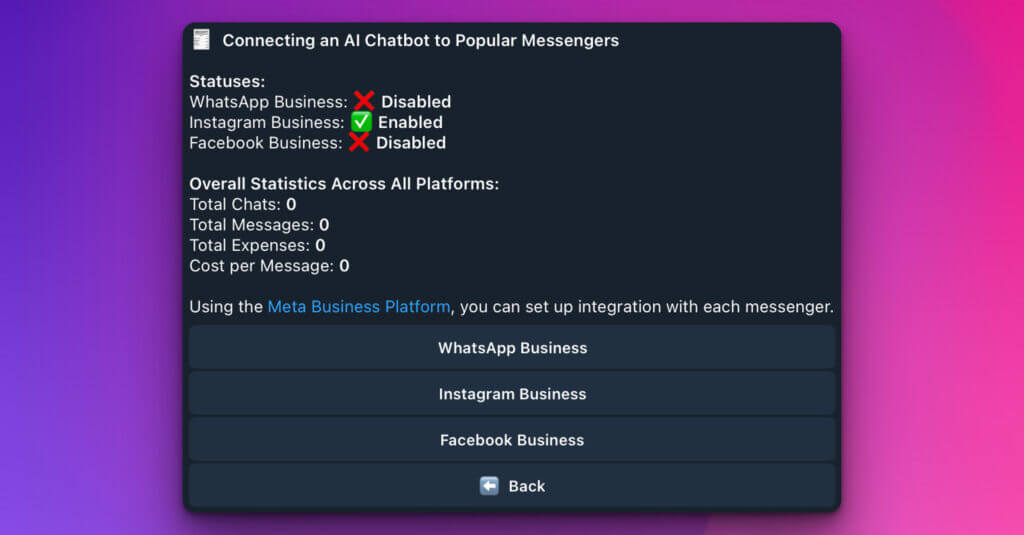
यह section इन Meta platforms से आपके chatbot के connection status का overview और उसकी activity का consolidated view देता है।
Connection statuses:
- WhatsApp Business: (e.g., ❌ Disabled) – बताता है कि आपका AI chatbot WhatsApp Business पर connected और active है या नहीं।
- Instagram Business: (e.g., ✅ Enabled) – दिखाता है कि आपका AI chatbot Instagram Business पर connected और active है या नहीं।
- Facebook Business: (e.g., ❌ Disabled) – बताता है कि आपका AI chatbot Facebook Business पर connected और active है या नहीं।
Overall statistics across all platforms:
- Total Chats: (e.g., 0) – सभी integrated platforms पर bot द्वारा handled conversations की combined number।
- Total Messages: (e.g., 0) – इन platforms पर bot द्वारा processed incoming और outgoing messages की total number।
- Total Expenses: (e.g., 0) – इन platforms पर bot चलाने से जुड़े aggregated costs, अगर applicable हों।
- Cost per Message: (e.g., 0) – अगर expenses ऐसे track होते हैं, तो average cost per message।
Meta Business Platform के माध्यम से integration
iSales AI Chatbot को WhatsApp Business, Instagram Business और Facebook Business से connect करने की key Meta Business Platform (पहले Facebook Business Suite/Manager) है। आम तौर पर आपको:
- हर respective platform के लिए Business accounts setup करने होंगे (WhatsApp Business API, Instagram Professional Account, Facebook Page)।
- iSales AI Chatbot जैसे third-party applications के लिए permissions और integrations manage करने हेतु Meta Business Platform use करना होगा।
- हर messenger के लिए iSales AI द्वारा दिए गए specific integration steps follow करने होंगे, जिनमें access authorize करना और chatbot को Meta Business assets से link करना शामिल हो सकता है।
Dedicated integration settings:
- 💬 WhatsApp Business:
- WhatsApp Business account के साथ AI chatbot integration connect, disconnect या configure करने के settings access करने के लिए click करें।
- इसमें API key input, webhook configuration या Meta Business Platform के जरिए authentication जैसे steps हो सकते हैं।
- 📸 Instagram Business:
- Instagram Business account के साथ integration manage करने के लिए click करें।
- आप AI chatbot को direct messages (DMs) और संभवतः Instagram profile की अन्य interactions handle करने के लिए connect कर पाएंगे।
- 👍 Facebook Business:
- अपनी Facebook Page की messaging (Messenger) के साथ connection configure करने के लिए click करें।
- इससे AI chatbot inquiries manage, support provide और Facebook Page को message करने वाले users से engage कर सकेगा।
Multi-platform integration के benefits:
- Customers जहां हैं वहीं मिलें: users से उनकी preferred messaging apps पर engage करें।
- Consistent brand voice: अपनी single AI chatbot configuration से सभी channels पर unified और consistent brand experience दें।
- Increased efficiency: responses automate करें और human team पर दबाव डाले बिना higher volume of inquiries manage करें।
- Centralized insights: यह page overall statistics दिखाता है; individual integrations अधिक granular data दे सकती हैं और iSales AI detailed analytics के लिए central dashboard दे सकता है।
iSales AI Chatbot को WhatsApp, Instagram और Facebook से connect करके आप उसकी reach और effectiveness काफी बढ़ाते हैं, जिससे वह सचमुच omnichannel communication powerhouse बन जाता है।