Photo/Video Content का मोनेटाइजेशन
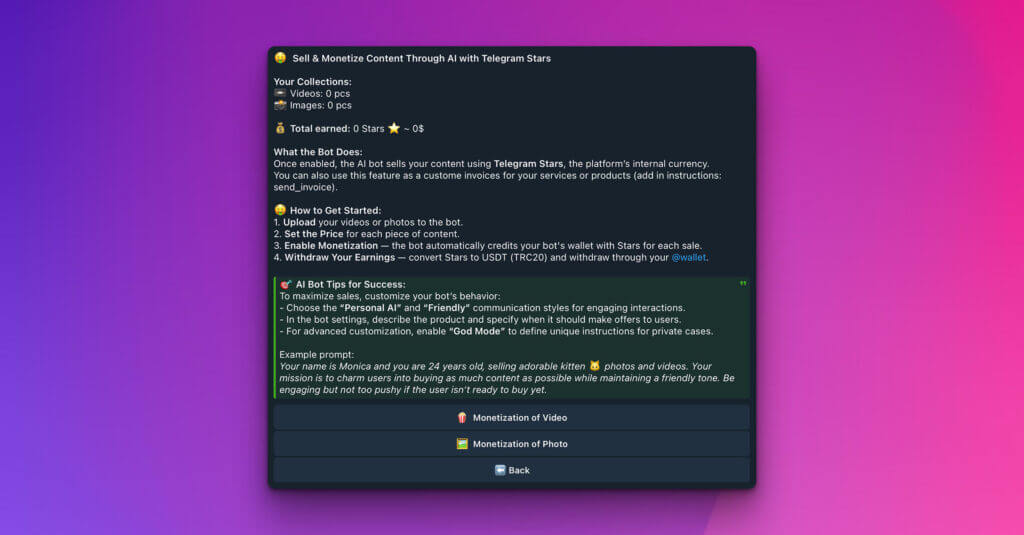
अपने visuals बेचें: AI के साथ photo और video content monetize करें
iSales AI Chatbot के साथ अपने visual media की earning potential unlock करें! यह section बताता है कि आप Telegram Stars के साथ AI के जरिए content बेच और monetize कैसे कर सकते हैं, ताकि आपकी photos और videos steady income stream बन सकें।
आपके content collections और earnings overview:
सबसे ऊपर आपको अपने monetization efforts का quick snapshot मिलेगा:
-
Your Collections:
- 🎬 Videos: (जैसे, 0 pcs) दिखाता है कि आपने sale के लिए कितनी video files available की हैं।
- 🖼️ Images: (जैसे, 0 pcs) दिखाता है कि sale के लिए कितनी image files available हैं।
-
Total earned: (जैसे, 0 Stars ✨ ~ 0$) Telegram Stars में आपकी accumulated earnings और उनकी approximate equivalent value track करता है।
Bot क्या करता है: आपका automated sales agent
Enable और configure होने के बाद, आपका AI bot digital content के लिए आपका personal sales agent बन जाता है:
-
Automated sales: AI bot आपकी uploaded photos और videos users को सीधे बेचता है और platform की internal currency Telegram Stars से payments process करता है।
-
Custom invoicing capability: Direct content sales के अलावा, आप इस feature से अपनी services या अन्य products के लिए custom invoices भी बना सकते हैं। इसके लिए आम तौर पर bot की general instructions में
send_invoiceजैसी specific instruction add की जाती है, जिससे bot को पता चलता है कि कब और कैसे custom invoices issue करने हैं।
कैसे शुरू करें: 4 आसान steps
Sale के लिए content setup करना straightforward है:
-
📤 अपना content upload करें: videos या photos को bot के content monetization system में upload करें।
-
💲 Price set करें: हर content piece, यानी हर video या photo, का sale price Telegram Stars में define करें।
-
✅ Monetization enable करें: सुनिश्चित करें कि monetization feature active है। Sale होते ही bot earned Stars को automatically आपके bot wallet में credit कर देता है।
-
💸 Earnings withdraw करें: अपनी accumulated Telegram Stars को USDT (TRC20) में convert करें और उन्हें अपने @wallet, Telegram के integrated wallet, या अन्य supported methods से withdraw करें।
💡 AI Bot tips for success: अपनी sales maximize करें
इस feature का maximum फायदा लेने और sales बढ़ाने के लिए bot behavior को इन tips से customize करें:
-
Engaging persona:
- “Personal AI Avatar” business role चुनें।
- “Friendly” communication style चुनें। ये settings potential buyers के साथ ज्यादा engaging और persuasive interactions बनाने में मदद करती हैं।
-
Clear product offering:
- Bot की general settings या specific instructions में product(s), यानी आपकी photo/video collections, को साफ-साफ describe करें और बताएं कि bot users को कब और कैसे offers करे।
-
God Mode के साथ advanced customization:
- Unique sales strategies या very specific handling वाले private cases के लिए “God Mode.” enable करें। इससे आप unique, highly detailed instructions define कर सकते हैं जिन्हें bot precisely follow करेगा।
-
Compelling bot prompt बनाएं (Example):
- अपने bot को personality और mission दें। उदाहरण:
Your name is Monica and you are 24 years old, selling adorable kitten 😺 photos and videos. Your mission is to charm users into buying as much content as possible while maintaining a friendly tone. Be engaging but not too pushy if the user isn't ready to buy yet. - ऐसा prompt AI को अपना role, target audience और sales approach समझने में मदद करता है।
- अपने bot को personality और mission दें। उदाहरण:
Sale के लिए content manage करें:
Interface visual media manage करने के लिए dedicated sections देता है:
-
🎬 Monetization of Video: नई videos upload करने, existing videos के prices set या adjust करने और sale के लिए video collection manage करने के लिए यहां click करें।
-
🖼️ Monetization of Photo: नई photos upload करने, images के prices set या adjust करने और purchase के लिए available photo collection manage करने के लिए यहां click करें।
इन steps और tips को follow करके आप अपने photo और video content को effectively monetize कर सकते हैं और iSales AI Chatbot को sales संभालने दे सकते हैं, जबकि आप creation पर focus करते हैं।