Short answer: A Chrome extension that "sends WhatsApp for you" is risky on two fronts at once. It endangers your number (the one-text-to-everyone pattern is exactly what WhatsApp's spam detection hunts), and it endangers your session, because it works by running its own code inside your logged-in WhatsApp Web. In October 2025, Socket's threat researchers found 131 of these extensions were rebranded clones of a single tool. You can screen any extension against that pattern in about a minute. This page gives you the checklist, then the three real ways to broadcast that don't rest on a browser add-on.
- Who it's for: anyone who searched "WhatsApp bulk sender" for their own contact list and paused at "is this safe?".
- What you'll get: the anatomy of a dangerous extension, a copyable 5-flag audit you can run now, and a clear "use the official API instead" line for when that's the right call.
- Last updated: 2026-07-05.
The one-minute verdict
Most "WhatsApp sender" extensions do the same thing under the hood: they open WhatsApp Web in your browser and inject JavaScript that drives it (typing, sending, scheduling, sometimes scraping your contacts) faster than a human could. That single design choice is what makes them dangerous, and it's why "it's on the Chrome Web Store" is not the reassurance it sounds like. The store runs a policy review, not a security certification; a listing is not an audit.
If you only take one thing from this page: remember whose account it is. The ban lands on your number, the injected code runs in your session, and the developer who wrote it is often someone you can't name. Below is how to tell a dangerous extension from a merely useless one, and what to reach for instead.
What Socket actually found in 2025
In October 2025, the threat-research team at Socket published an investigation into WhatsApp sender extensions in the Chrome Web Store. Malwarebytes and The Hacker News reported on it the same month. The finding is the useful part, so keep the attribution straight: Socket found the campaign; the security press amplified it.
What they found:
- 131 extensions that were the same tool. All 131 shared one codebase, the same design patterns, and the same infrastructure: rebranded clones listed under different names. Socket describes them as "not classic malware," but functioning as "high-risk spam automation that abuses platform rules."
- They work by injecting code into
web.whatsapp.com. The extensions run JavaScript alongside WhatsApp's own scripts to automate bulk sending, scheduling, and contact scraping at a scale WhatsApp's own anti-spam rules are meant to stop. - A franchise business model explains the clones. Socket traced the cluster to a Brazilian operator, DBX Tecnologia, running a white-label reseller program: pay roughly R$12,000 (about $2,180) to rebrand the extension and sell it as your own. That's why there are 131 near-identical listings instead of one, each a reseller's copy. Across the cluster, Socket counted on the order of 20,000 active users; the largest single clone had about 10,000.
- It broke platform rules, not just etiquette. Shipping many duplicate-function extensions violates the Chrome Web Store's spam and abuse policy, and automating WhatsApp this way breaks WhatsApp's terms.
The whole category runs on one template: a single tool, many faces, an anonymous operator, code in your session. Those 131 removals are the symptom; the template is the thing, and you can audit for it yourself.
Two dangers, one install
Most warnings about sender extensions stop at "you'll get your number banned." That's real, but it's only half of it.
Danger one: your number. Blasting the same message to a list, fast, from a fresh number is the textbook spam signature, and it's exactly the pattern platform spam enforcement is built to catch. There's no counter-move inside an extension for this, because the extension's whole value proposition is speed, the opposite of what keeps a number alive.
Danger two: your session. This is the one the "will I get banned?" framing misses. To do its job, the extension runs its own code inside your logged-in WhatsApp Web tab. That is what makes Socket's privacy caveat land: code injected into your session can, in principle, read what's on your screen and touch your login state. You don't have to assume malice to be uncomfortable here: you're granting an unidentifiable white-label reseller a foothold in your live WhatsApp. "Not classic malware" is a low bar to clear.
That second danger is why the audit below weights who made it and what it can touch, not just will it get me banned.
The 5-flag extension audit (copy this, run it in 60 seconds)
Open the extension's Chrome Web Store page and its permissions (Chrome → Manage extensions → the extension → Details → Permissions), and score it. Any one flag is a real risk. Three or more and you're looking at the 131 pattern.
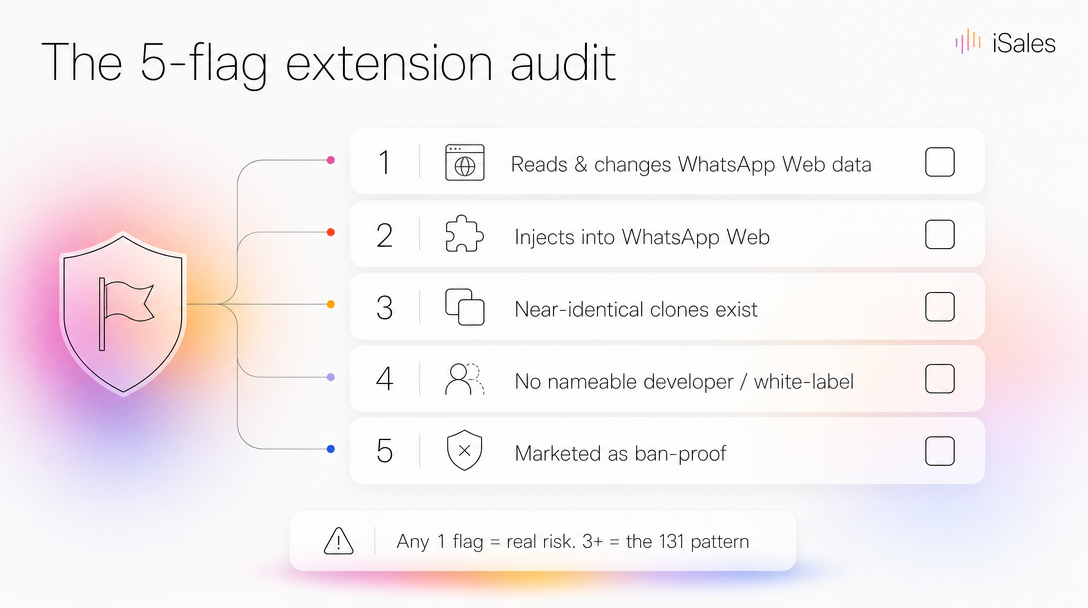 Any one flag is a real risk; three or more is the 131-clone pattern.
| # | Red flag | How to check | Your extension |
|---|---|---|---|
| 1 | Can "read and change your data" on web.whatsapp.com (or on all sites) | Details → Permissions | ▢ |
| 2 | Works by driving/injecting into WhatsApp Web | Its own description: "opens WhatsApp Web", "injects", "automates sending" | ▢ |
| 3 | Near-identical clones exist under other names | Search the store for the same screenshots / feature list | ▢ |
| 4 | No nameable developer, or sold as a white-label / "become a reseller" | Developer field, the vendor's own site | ▢ |
| 5 | Markets itself as ban-proof, "unlimited", or "undetectable" | The landing-page headline | ▢ |
Flags 4 and 5 are the fastest tells. A tool sold as a rebrandable franchise has no accountable owner, and any product that headlines being ban-proof is selling an immunity that doesn't exist (the myth a sibling piece takes apart). What actually moves ban risk is pace and personalization, and a blaster is built to skip both.
The three real ways to broadcast to your own list
If you genuinely need to message a list you own, there are three practical paths, and they are not equal.
| Sender extension | Official WhatsApp Business API | Your own number, automated | |
|---|---|---|---|
| Account it uses | Your number, driven via a browser tab | A separate WABA account | Your regular number (linked device) |
| Ban risk | High (the flagged pattern) | Lowest, sanctioned by Meta | Reduced, not removed: warmup + caps |
| The message | One text to everyone | Pre-approved templates, opt-in required | AI-written, different per contact |
| Code in your session | Yes, injected JS | No | No, server-side session |
| Setup | Seconds | Template approval + opt-in flow | Connect, then a 2–3 week warmup |
| Who it's actually for | Nobody — walk away | Opted-in lists, notifications at scale | Your own list, real two-way conversations |
Look hard at the ban-risk row: the official API wins it outright. If your priority is the lowest possible chance of losing the number, and you can live with template approvals and opt-in, the API is the correct tool and this article's other paths are not for you. The unofficial "your own number" path — the one iSales runs — trades some of that safety for your real number, real conversations, and a message that's different for every contact. It reduces ban risk with warmup and daily caps; it does not remove it, and it asks for a two-to-three-week setup the API doesn't. That is a real cost, and the API buyer is right to weigh it.
The only column with no defensible "best for" is the extension. Whatever it saves you in setup, it spends on your number and your session.
When you shouldn't automate at all
Skip all three if this is you: your list is small, fully opted-in, and you're usually near your phone anyway. If you only message people who messaged you first, an extension, an API, and an agent are all overkill — just reply. And if you need reliable one-way notifications to people who opted in (order updates, appointment reminders), the official API is the answer, not any workaround. The automation question only pays off once you're broadcasting to your own base at a volume your thumbs can't keep up with — and even then, the tool you choose matters more than the fact that you chose one.
FAQ
Does a Chrome Web Store listing mean an extension is safe? No. The store runs a policy-compliance review, not a security certification. The 131 spamware extensions Socket found were listed on the store while breaking its own spam policy.
Can WhatsApp ban me just for having the extension installed? The ban risk comes from the sending behavior — bulk, identical, fast — not merely from the install. But the install is what enables that behavior and puts code in your session, so removing it is the safe default if you're not actively, carefully using it.
Is there a sender extension that's actually safe? Screen any candidate with the 5-flag audit above. If it injects into WhatsApp Web, is one of many clones, or promises it can't be banned, treat it as the pattern Socket documented. For anything at real volume, the official API or an unofficial linked-device setup with warmup and caps is a sturdier foundation than a browser add-on.
What's the difference between this and the official WhatsApp Business API? The API is Meta-sanctioned, lowest-ban-risk, and built for opted-in template messaging. It runs on a number registered to a WhatsApp Business (WABA) account, which can't also live in the normal WhatsApp app, and it's rigid for real two-way conversations. See the three-way table above, and the pillar guide to automating your own number for the full trade-off.
Sources & further reading
- Socket Threat Research Team, "131 Spamware Extensions Targeting WhatsApp Flood Chrome Web Store," October 2025 — the primary investigation.
- Malwarebytes, "Over 100 Chrome extensions break WhatsApp's anti-spam rules," 22 October 2025 — reporting on Socket's finding, plus the permission-checking guidance.
- The Hacker News, "131 Chrome Extensions Caught Hijacking WhatsApp Web for Massive Spam Campaign," October 2025.
- For the safer paths: our complete guide to WhatsApp automation on your own number and why "no-ban" broadcasting is a myth.
Prefer to run your own number with warmup, daily caps, and a different AI-written message per contact — and never put code in your browser session? That's what iSales does, from the Telegram you already use. Pay per action, start free: Connect your WhatsApp agent →