AI निर्देश
परफेक्ट prompts बनाना: AI Bot Instructions की गहरी समझ
AI Bot Instructions सेक्शन में आपका स्वागत है, जो आपके chatbot की operational intelligence का केंद्र है। स्पष्ट और अच्छी तरह लिखे निर्देश आपके bot के लिए उसकी tasks, communication goals और आपके business को प्रभावी ढंग से represent करने के तरीके को समझने के लिए बेहद जरूरी हैं। इसे natural language के जरिए अपने bot के behavior और responses को program करने जैसा समझें।
यहां आप bot की role specify करेंगे, उसकी tasks define करेंगे, और web links, phone numbers या ऐसी कोई भी जरूरी information देंगे जिसकी उसे flawless performance के लिए जरूरत हो।
Prompting की कला: अपनी AI को सफलता की ओर guide करना
Effective prompting आपके AI chatbot की पूरी क्षमता unlock करने की key है। आपके instructions bot के follow करने वाले primary "prompt" या directives के set की तरह काम करते हैं। यहां कुछ fundamental techniques हैं:
-
Role define करें: शुरुआत में साफ बताएं कि bot क्या है। उदाहरण के लिए:
- "आप 'YourCompanyName' के लिए एक friendly और efficient customer support agent हैं।"
- "आप हमारी नई tech gadget line में specialized knowledgeable sales assistant हैं।"
- "आप downtown में luxury properties के लिए professional real estate consultant हैं।"
-
Specific tasks outline करें: विस्तार से बताएं कि आप bot से क्या करवाना चाहते हैं। स्पष्ट रहें।
- "आपका primary task हमारे products के बारे में customer questions का answer देना है, जिसमें pricing, shipping और return policies शामिल हैं।"
- "आपको customers से उनके budget, needs और timeline के बारे में पूछकर leads qualify करनी हैं।"
- "Company के return policy document के अनुसार product return requests process करें।"
-
Communication style set करें: Bot को guide करें कि उसे कैसे interact करना है।
- "सभी communications में friendly, empathetic, लेकिन professional tone इस्तेमाल करें।"
- "Formal और concise business communication style बनाए रखें।"
- "Welcoming atmosphere बनाने के लिए appropriate जगहों पर enthusiastic रहें और emojis का इस्तेमाल करें।"
-
Specific scenarios और keywords दें: Common situations या queries handle करने के examples दें।
- "अगर client discounts के बारे में पूछे, तो उसे 'promotions.txt' में listed current promotions बताएं और best one apply करने की पेशकश करें।"
- "जब customer frustration express करे, तो उसकी feeling acknowledge करें, किसी भी inconvenience के लिए apologize करें, और अगर दो attempts के बाद issue unresolved रहे तो उसे human agent तक escalate करें।"
- "Immediate order processing के keywords: 'buy now', 'place order', 'checkout'."
-
XML Tags से structure करें (Advanced): Complex instructions या information blocks को clearly separate करने के लिए simple XML-like tags इस्तेमाल करने पर विचार करें। इससे bot आपके instructions के अलग-अलग parts को ज्यादा effectively parse और understand कर सकता है।
<product_info>Details about product A...</product_info><return_policy>Our return policy is...</return_policy><contact_details><phone>123-456-7890</phone><email>[email protected]</email></contact_details>
-
Clear और concise रहें: Ambiguity से बचें। आपके instructions जितने straightforward होंगे, bot उतना बेहतर perform करेगा।
-
Iterate और refine करें: Prompting अक्सर iterative process होता है। अपने instructions के साथ bot test करें, देखें वह कैसे respond करता है, फिर बेहतर results के लिए prompts tweak करें।
AI Bot Instructions Interface में navigation
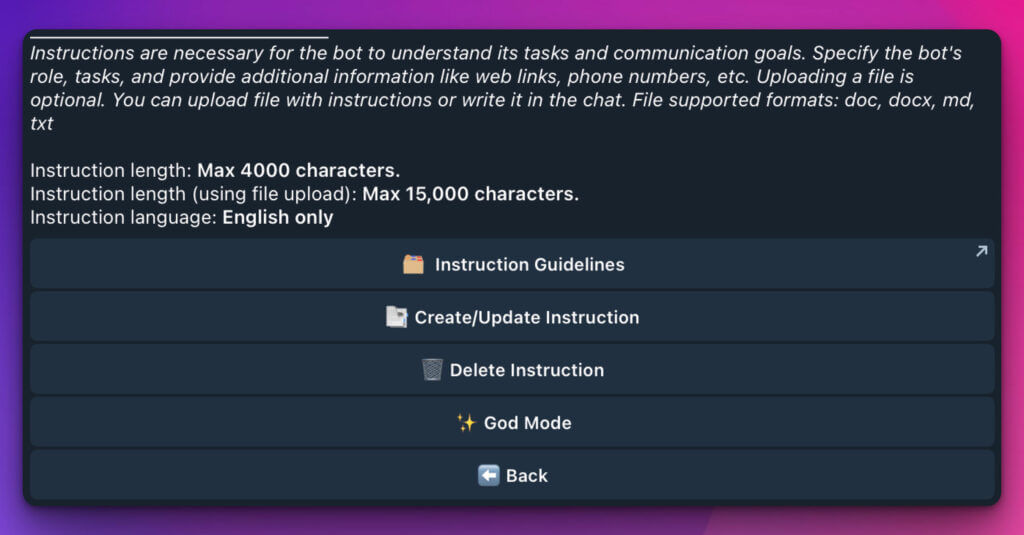
"AI Bot Instructions" screen आपको ये tools देती है:
📜 Instruction Guidelines
यह section (अक्सर clickable button या link) आपको iSales AI की ओर से best practices, tips और detailed examples देगा, ताकि आप अलग-अलग scenarios के लिए सबसे effective instructions लिख सकें। Latest official guidance के लिए हमेशा इसे देखें!
✍️ Instruction create/update करें
यह आपके bot का brain craft करने का primary workspace है। Instructions input करने के दो तरीके हैं:
-
Direct Text Input: Provided field में अपने instructions सीधे type या paste करें।
- Character Limit: अधिकतम 4,000 characters.
- Shorter, more focused instruction sets या quick updates के लिए ideal.
-
File Upload: अगर आपके instructions extensive हैं या पहले से documented हैं, तो आप file upload कर सकते हैं।
- Character Limit (via file): अधिकतम 15,000 characters.
- Supported Formats: .doc, .docx, .md, .txt.
- यह method detailed operational manuals, comprehensive product guides या complex role definitions के लिए perfect है।
Important Note: सभी instructions, चाहे typed हों या uploaded, AI द्वारा optimal processing और understanding के लिए English में होने चाहिए।
🗑️ Instruction delete करें
अगर आपको fresh start करना है या अपने bot की directives को पूरी तरह overhaul करना है, तो यह option currently loaded सभी instructions remove करने देता है। सावधानी से इस्तेमाल करें, क्योंकि यह bot की current operational script erase कर देगा।
✨ God Mode
"God Mode" advanced users के लिए designed powerful feature है, जो अपने bot के behavior पर granular control चाहते हैं।
-
यह क्या करता है: जब God Mode enabled होता है, bot सभी internal iSales AI optimizations और pre-set instructions disable कर देता है। वह system prompt के रूप में सिर्फ आपके personal instructions use करेगा।
-
इसे क्यों use करें?
- Highly specialized या non-standard tasks के लिए।
- जब आपको bot से system defaults की किसी interference के बिना absolute strictness के साथ अपने instructions follow करवाने हों।
- Unique और complex operational algorithms के साथ experiment करने के लिए।
-
Caution: क्योंकि system optimizations bypass हो जाती हैं, God Mode में आपके instructions की clarity और completeness और भी critical हो जाती है। Incomplete या poorly written instructions unpredictable bot behavior का कारण बन सकते हैं। सिर्फ intelligence level (LLM model) inherit होता है; बाकी सभी settings आपके prompt से override हो जाती हैं।
God Mode enable/disable करने के लिए:
-
"God Mode" section में जाएं।
-
इसे चालू करने के लिए "Activate" पर click करें या system optimizations के साथ standard operation पर लौटने के लिए "Deactivate" पर click करें।
-
God Mode enable करने या उसमें changes करने के बाद हमेशा thoroughly test करें।
Instructions के लिए key considerations:
-
Relevance: सुनिश्चित करें कि instructions हमेशा आपके current business goals, products और policies के साथ up-to-date रहें।
-
Testing: Instructions में किसी भी update के बाद अपने bot को rigorously test करें। उसे various queries भेजें, different customer scenarios simulate करें, और ensure करें कि वह expected behavior दिखा रहा है।
-
File Uploads: File upload करते समय ensure करें कि text clean, well-formatted और English में हो। एक समय में केवल एक instruction file supported है; अगर आपके पास multiple documents हैं, तो upload से पहले उन्हें एक में consolidate करें।
AI Bot Instructions की कला में mastery हासिल करके, आप एक truly intelligent और effective assistant बना सकते हैं जो आपके operations streamline करे और आपके customers को delight करे।